

Features
Enable interACT
Section titled “Enable interACT”This feature enables or disables the interACT functionality in XDR Forensics.
- interACT allows users to remotely open a shell session to interact with assets. Users can execute commands and scripts based on their assigned privileges.
- Read more about interACT here: interACT
Resolve Responder Public IP
Section titled “Resolve Responder Public IP”This feature allows XDR Forensics to capture and associate the public IP of an asset.
- When enabled, the XDR Forensics Console parses HTTP request headers to extract the
X-Forwarded-Forheader provided by proxies. This header reveals the public IP address of the responder (asset), even if it’s behind a proxy or firewall. - Visibility: If the feature is enabled, XDR Forensics will display the
X-Forwarded-ForIP address instead of the communication IP (the one directly visible to XDR Forensics). This provides more accurate forensic visibility of an asset’s location and origin.
Custom Evidence Collection Naming
Section titled “Custom Evidence Collection Naming”Change the location and file name of collected evidence in Assets (on local machines) and remote Evidence Repositories.
You can configure a custom naming template by combining text and variables:
| Variable | Description |
|---|---|
| Timestamp (Mandatory) | Date/time of acquisition |
| Organization Name | Name of the organization |
| Acquisition Profile | Profile used for collection |
| Task Type | Type of task performed |
| Task Name | Name of the acquisition task |
| Asset Name | Name of the asset |
| Case ID (If Exists) | Associated case identifier |
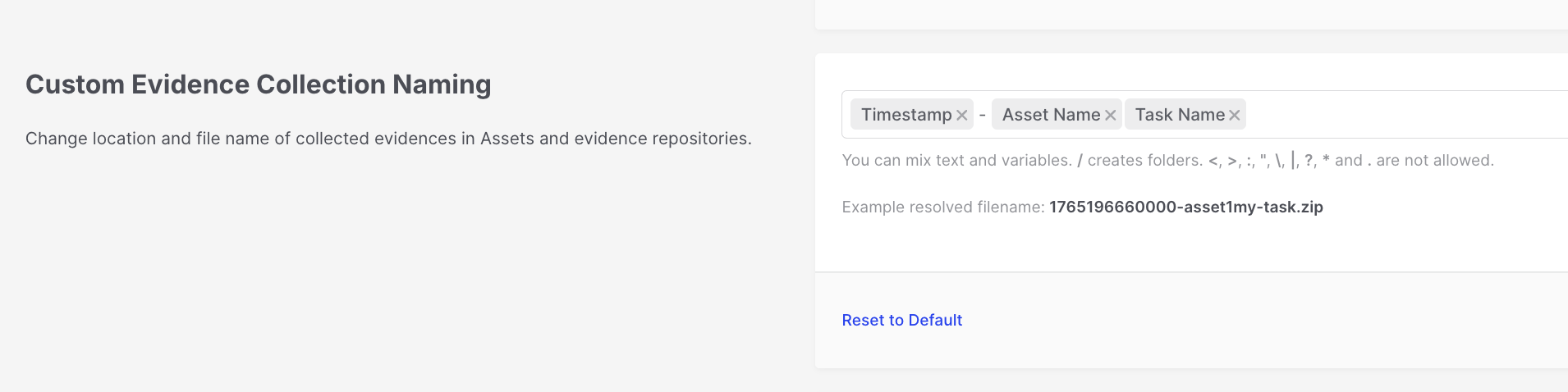
Evidence Repositories: Custom Evidence Collection Naming
RFC3161 Timestamping
Section titled “RFC3161 Timestamping”Provides cryptographic proof of when data was acquired and its integrity.
- RFC3161 timestamping ensures that the data collected during acquisition has a digital signature, proving that the data existed at a specific time and has not been altered since.
- When enabled, every new acquisition task will include a signature file with metadata, adding legal and forensic robustness to your investigation process.
Chain of Custody
Section titled “Chain of Custody”Protect evidence integrity by registering it on the blockchain via LOCARD, which is a blockchain-based system for secure evidence handling in digital forensics. It has seen some adoption in Europe but remains underutilized in the U.S. due to regulatory and infrastructure challenges, leading to slower adoption and less frequent use.
- This feature integrates with LOCARD, a blockchain-based platform for evidence integrity. When enabled, the chain of custody for digital evidence is secured by submitting evidence metadata to the blockchain, ensuring it hasn’t been tampered with.
- LOCARD Credentials: To use this, you’ll need to provide the Organization, Host, Username, and Password for your LOCARD account.
SMTP (Email Configuration)
Section titled “SMTP (Email Configuration)”Set up email notifications, such as password-reset emails.
- Specifying an SMTP server allows XDR Forensics to send out automated emails, particularly for password resets. This is useful for self-service password recovery.
- You must configure the SMTP server address, port, sender email, username, and password. For example, using
mail.smtp2go.comas the server.
Syslog / SIEM Integration
Section titled “Syslog / SIEM Integration”Enable integration with Syslog servers or SIEM systems.
- This feature allows XDR Forensics to send event logs to a centralized Syslog or SIEM (Security Information and Event Management) system for enhanced log monitoring and analysis.
- You will need to configure the protocol (TCP/UDP), server address, and port to send logs from XDR Forensics to your preferred log management system.
- You can control which events are transmitted via Syslog using one of three modes: send all events (default), include only selected event types, or exclude specified event types. This helps reduce noise in downstream SIEM pipelines while still allowing high-value activities—such as case creation and authentication events—to be streamed when you configure inclusion rules accordingly.
- Analytics in the Console reports adoption and usage metrics for this Syslog filtering configuration, supporting audits of how the integration is used over time.
Banner Message
Section titled “Banner Message”Display a custom banner message across all XDR Forensics Console pages.
- This feature allows you to set a banner message that will appear on all pages of the XDR Forensics Console. This is useful for displaying system notices, warnings, or other important information to all users.
Enable Policy
Section titled “Enable Policy”Enforce task options and preferences across assets.
Policies allow administrators to define global task preferences and restrictions for assets in the organization.
- Customizability: Policies can be tailored for different subsets of assets using filters, and a user must have the “Override Policy” privilege to modify the default organizational policies.
Auto Asset Tagging
Section titled “Auto Asset Tagging”Automate tagging of assets when they are added to XDR Forensics.
- When this feature is enabled, XDR Forensics automatically applies asset tags based on predefined rules as soon as a responder is installed on an asset.
- Flexibility: Even if this feature is disabled, users can still run the Auto Asset Tagging task manually on assets.